Managing your projects is very easy and intuitive. The place to start is the Project List Page.
You access this page via the main menu:
:: Main Menu > Projects
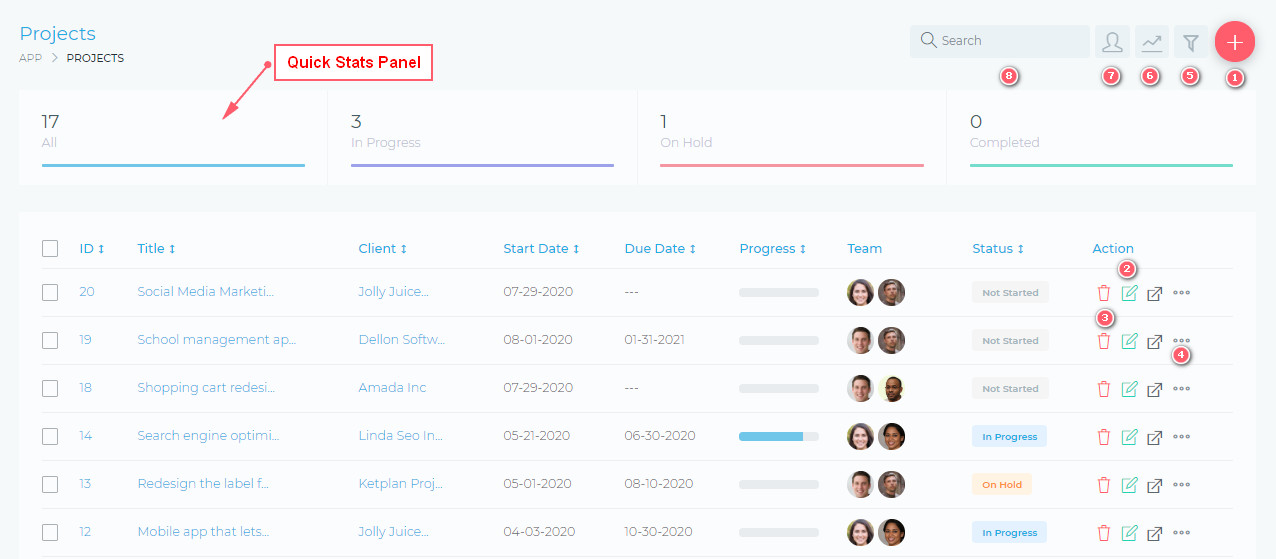
From this page, you are able to view and do the following:
- (1) Create a new project
- (2) Edit an existing project
- (3) Delete a project
- (4) Quickly manage additional project setting, via the quick actions, drop menu.
- (5) Filter projects, using a detailed filter panel. You can filter by project dates, categories, statuses, etc.
- (6) Toggle (hide/show) the Quick Stats panels
- (7) As the admin user, you can select to view all projects or only the projects that you are assigned to.
- (8) Search your projects, using the free text search box.
Facebook Comments