Clients are reluctant to commission a project when the cost is unknown. This is where cost estimates can help you generate more work. Estimates help the client to understand what sort of budget is required for the work that they want to be undertaken.
Project Management Software enables you to create estimates, which you can use to better convert your leads into customers.
The best place to start is the Estimates page.
:: Main Menu > Sales > Estimates
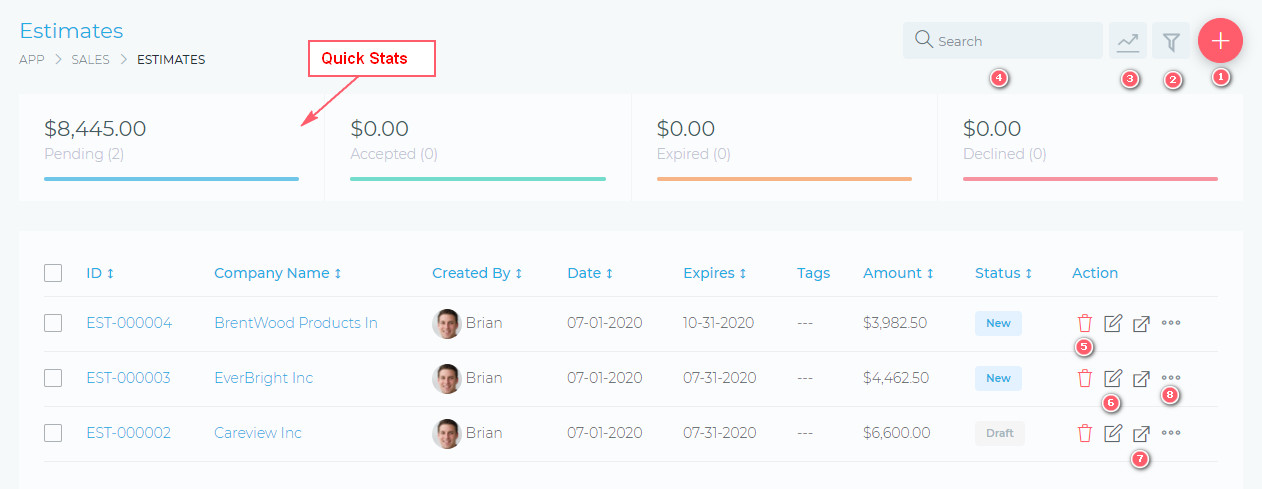
From this page, you are able to view and do the following:
- (1) Create a new estimate
- (2) Filter estimates, using a detailed filter panel. You can filter estimates by dates, categories, statuses, etc.
- (3) Toggle (hide/show) the Quick Stats panels
- (4) Search your estimates, using the free text search box.
- (5) Delete an estimate
- (6) Edit an estimate
- (7) View an estimate
- (8) Additional estimate management settings, via the quick actions button.
Facebook Comments