⌘K
Restaurant Complete Management Website & POS System Software
📄
Dashboard
📄
Web Setting
📄
Common Setting
📄
Banner Setting
📄
Menu Setting
📄
Seo Setting
📄
Social Setting
📄
Widget Setting
📄
Email Setting
📄
Customer
📄
Coupon List
📄
Subscribe List
📄
Setting
📄
Payment setting
📄
Manage Table
📄
Customer type
📄
kitchen Setting
📄
Unit Measurement
📄
SMS Setting
📄
Bank
📄
Language
📄
Application setting
📄
App Setting
📄
Currency
📄
Country
📄
State
📄
Payment Method
📄
Shipping Method
📄
Supplier Manage
📄
Manage Table
📄
Role Permission
📄
Permission Setup
📄
Add Role
📄
Role List
📄
User Access Role
📄
Reservation
📄
Reservation
📄
Add Booking
📄
Purchase Manage
📄
Purchase Item
📄
Add Purchase
📄
Purchase Return
📄
Return Invoice
📄
Supplier Manage
📄
Supplier Ledger
📄
Food Management
📄
Manage Category
📄
Manage Food
📄
Manage Adons
📄
Production
📄
Set Production Unit
📄
Production Set List
📄
Add Production
📄
Manage Order
📄
Pos Invoice
📄
Order list
📄
Pending order
📄
Complete order
📄
Cancel order
📄
Kitchen Dashboard
📄
Counter Dashboard
📄
POS Setting
📄
Human Resource
📄
HRM
📄
Attendance
📄
Expense
📄
Award
📄
Recruitment
📄
Department
📄
Leave
📄
Loan
📄
Payroll
📄
Report
📄
Purchase Report
📄
Stock Report (Product Wise)
📄
Stock Report (Kitchen)
📄
Sell Report
📄
Sell Report Filtering
📄
sell By Date
📄
Accounts
📄
Chart of Account
📄
Supplier Payment
📄
Cash Adjustment
📄
Debit Voucher
📄
Credit Voucher
📄
Contra Voucher
📄
Journal Voucher
📄
Voucher Approval
📄
Account Report
📄
User
📄
Add User
📄
User List
📄
Addon
📄
Autoupdate
📄
Message
📄
New
📄
Inbox
📄
Sent
📄
Rating
📄
Unit and Ingredients
📄
Unit Measurement
📄
Manage Ingredients
Country
Home
/
Restaurant Complete Management Website & POS Syste…
/
Setting
/
Country
Last updated
10/27/2020
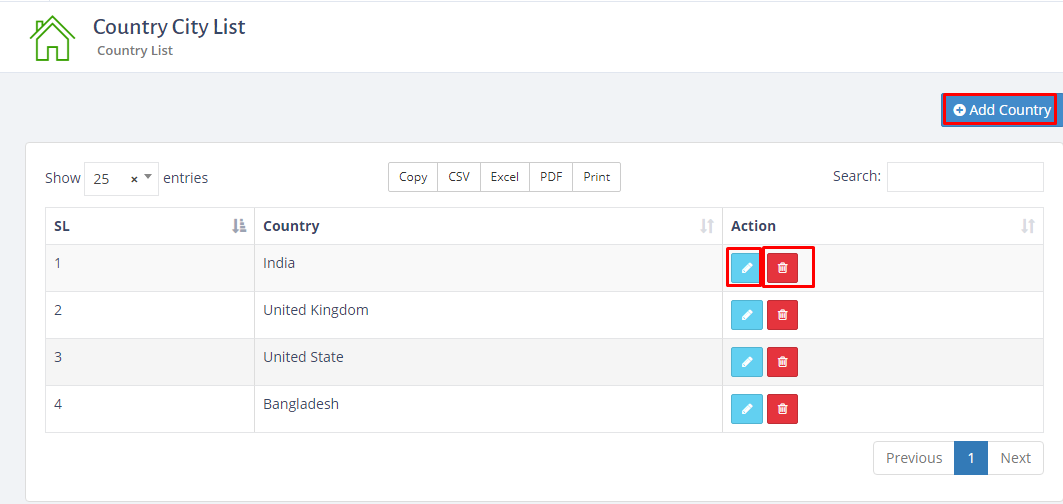
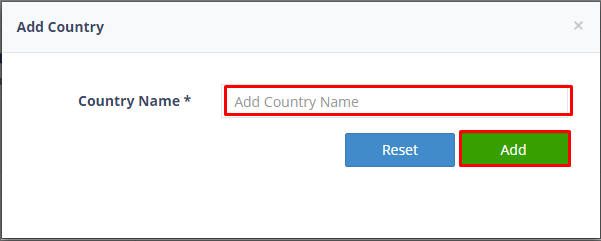
To set up the country go to setting>click country>click country list>here you can delete,edit and add country.Please see the screenshots below:
Facebook Comments
Still stuck? How can we help?
Get Help
Was this article helpful to you?
Yes
(0)
No
(0)
←
Currency
State
→
Print
Scroll